
Machine Accessibility: A Practical Guide to Agentic Web Readiness
Machine Accessibility: A Practical Guide to Agentic Web Readiness
Enabling websites to work clearly for people, assistive technology, and AI agents
The web is becoming a shared environment for more than human visitors. People use browsers and assistive technology. Search systems interpret pages at scale. AI agents are beginning to find information, compare options, and complete tasks on a person’s behalf.
These visitors don't experience a website the same way. They rely on signals such as headings, labels, relationships, states, content, permissions, and predictable actions.
That leads to a practical question for marketers, product teams, and developers:
Can this website explain its meaning, actions, and boundaries clearly enough for people and machines to use it responsibly?
This article uses the term machine accessibility for that question.
Machine accessibility is not a new compliance standard. It does not replace WCAG conformance, usability testing, assistive-technology testing, security review, privacy work, or research with people with disabilities. It is a readiness lens that extends good accessibility practice to websites that may be interpreted or operated by AI agents.
The goal is not to create a separate website for robots. The goal is to create a clearer, more accessible, and more trustworthy web for everyone.
What is machine accessibility?
Machine accessibility is how clearly a digital experience communicates its purpose, structure, content, controls, states, and permitted actions to automated systems.
A machine-accessible website doesn't make an agent guess that a styled container is a button, figure out which label belongs to a form field, or infer whether a confirmation message means an action succeeded. It exposes the same useful meaning that a person needs.
This starts with established accessibility practice. WCAG 2.2 is organised around four principles: perceivable, operable, understandable, and robust. Machine accessibility asks one additional practical question:
Are those qualities also represented clearly in the page structure and interaction states?
A site may be easy for a machine to parse but difficult for people to use. It may also meet some accessibility requirements while still exposing an unclear journey to an agent. Responsible readiness requires both human-centred accessibility and machine-legible structure.
Why the agentic web changes the brief
A person may understand a page by combining its visual design, language, and context. An AI agent may work from several representations of the same page:
• the rendered page or screenshot;
• the HTML and DOM structure; and
• the browser accessibility tree, including roles, names, states, and relationships.
These views can disagree. A person may see a button while the HTML exposes only a generic container. A label may appear beside a field without being programmatically associated with it. A dialog may look closed while its controls remain available to keyboard users or automated systems.
Each mismatch creates uncertainty. Machine accessibility is therefore less about adding an “AI layer” and more about reducing ambiguity in the underlying experience.
The relationship between human and machine accessibility
The strongest machine-accessibility practices are familiar accessibility practices applied with careful attention to explicit meaning, consistent patterns, and state changes.
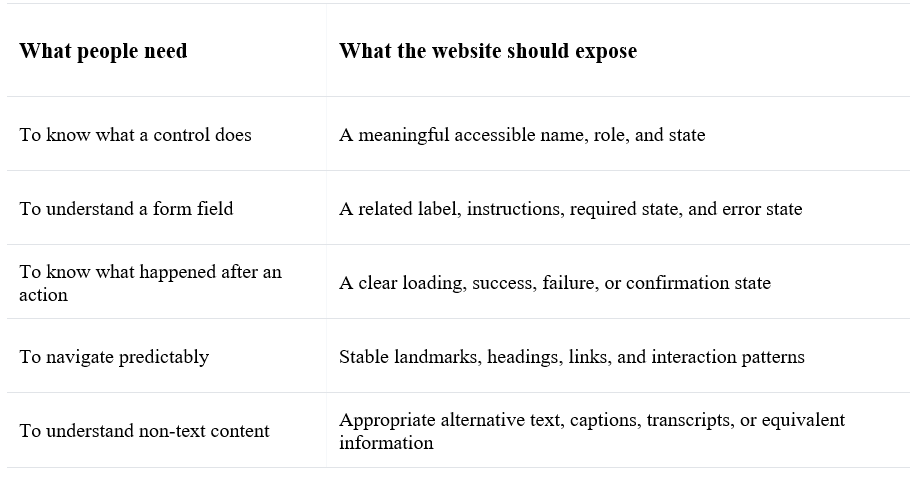
Seven foundations of machine accessibility
1. Use semantic HTML first
Use headings for headings, lists for lists, buttons for actions, links for navigation, and landmarks for major page regions. Semantic HTML gives browsers, assistive technologies, and agents a reliable starting point.
A clickable generic container may look correct but expose little meaning. A real button communicates that an action is available. A real link communicates that navigation will occur.
2. Give important controls a clear identity
Interactive elements need useful names and states. “View pricing,” “Save application,” and “Download the accessibility guide” usually communicate more than a repeated “Click here.”
For custom controls, expose the role, value, expanded or collapsed state, selected state, disabled state, and relationship to the content they control. Do not use colour or position as the only way to communicate status.
3. Make forms explain themselves
Forms support marketing enquiries, registrations, applications, donations, and purchases. Each field should have a visible label, clear instructions, an understandable required state, and specific error guidance.
The result of submission should also be observable. The interface should make it clear whether the request is processing, complete, blocked, or waiting for more information.
4. Keep journeys stable
Shifting layouts, invisible overlays, inconsistent controls, and unexpected content changes can confuse both people and agents. Important actions, labels, navigation patterns, and feedback should be predictable enough to support orientation and recovery.
Stability does not mean every page must look identical. It means users can recognise how the experience works.
5. Represent content accurately
Structured data can provide useful clues about pages, services, events, articles, organisations, and other entities. It should accurately reflect visible content. It is not a guarantee of search rankings, AI citations, rich results, or successful agent actions.
Consistent terminology matters too. If the same service has three different names across a site, people and systems must spend extra effort deciding whether the names refer to one offer or several.
6. Include documents and media
The accessible journey does not stop at HTML. PDFs, presentations, images, videos, audio, and downloadable forms also need attention.
Use meaningful document headings, logical reading order, alternative text, accessible tables, captions, and transcripts where appropriate. If essential information exists only in an image or poorly structured document, interpretation becomes less reliable for everyone.
7. Set boundaries and recovery paths
Agent readiness is not only about helping a system act. It is also about making clear what an agent may do, what requires confirmation, what data may be used, and how a person can interrupt or correct the process.
Filtering public content may be low risk. Submitting an application, making a purchase, changing an account, sharing personal data, or sending a message may require explicit confirmation and a clear summary of consequences.
A machine-accessible website should expose not only what can be done, but also what must not happen without permission.
Checklist: audit for machine accessibility
Use the checklist below to review one important journey, such as booking a consultation, completing a lead form, registering for an event, purchasing a service, or downloading a guide. Record the page or component tested, the issue found, the impact, and the fix.
1. Page purpose and content
- The page title states the page’s purpose.
- The main heading matches the page purpose.
- The intended audience and next step are clear.
- Important information is available as text, not only inside an image.
- Key terms, service names, prices, dates, and calls to action are used consistently.
- Links describe their destination or action without depending on surrounding visual position.
- The page has a clear primary action and does not present competing actions without context.
2. Semantic structure
- Heading levels follow a meaningful hierarchy.
- Landmark regions identify the header, navigation, main content, complementary content, and footer where appropriate.
- Lists, tables, quotations, and paragraphs use the correct HTML elements.
- Buttons are buttons; links are links; form controls are native controls where possible.
- The DOM order follows the intended reading and interaction order.
- Hidden content is not exposed to users or agents when it is not available.
3. Names, roles, and states
- Every interactive control has a meaningful accessible name.
- Icon-only controls have an accessible name that explains the action.
- Custom controls expose their role and current value.
- Expanded, collapsed, selected, checked, pressed, disabled, and busy states are exposed accurately.
- A control’s relationship to the content it changes is clear.
- Visible text and programmatic names do not contradict each other.
4. Forms and validation
- Every field has a visible, programmatically associated label.
- Instructions, examples, formats, and required status are available before input.
- Related fields are grouped and identified.
- Errors identify the field, explain the problem, and describe how to fix it.
- Errors are announced or otherwise made available to assistive technology.
- Focus moves to the right place after validation without disorienting the user.
- Loading, success, failure, and confirmation states are exposed clearly.
- A submitted action is not silently repeated when a user or agent retries.
5. Keyboard and focus behaviour
- Every important action is available by keyboard.
- Focus is visible and follows a logical order.
- Focus is not trapped unexpectedly.
- Dialogs, menus, disclosures, and popovers manage focus correctly.
- A keyboard user can reach, understand, and leave every interactive element.
- No action depends only on hover, drag, colour, or pointer precision.
6. Stability and predictable interaction
- Important controls keep consistent names and locations across related pages.
- Layout shifts do not move the control a user is about to select.
- Dynamic updates do not unexpectedly change context or steal focus.
- Overlays and modals have clear open and closed states.
- Time limits, session expiry, and irreversible actions are explained.
- Users can cancel, go back, retry, or recover from a failed action.
7. Content, media, and documents
- Images have appropriate alternative text or are marked decorative when appropriate.
- Videos have captions and transcripts where appropriate.
- Audio has an equivalent text option where needed.
- PDFs and downloads have meaningful filenames and accessible structure.
- Essential information is not communicated only through colour, animation, or visual layout.
- The language and reading direction are declared correctly.
8. Structured data and metadata
- Metadata describes the page accurately.
- Structured data matches visible page content.
- Organisation, service, article, event, or product details are not contradictory across the site.
- Canonical, language, and indexing signals are intentional.
- Robots and access controls do not unintentionally block important public content.
9. Permissions, privacy, and human control
- The site makes clear which actions are public, reversible, or high impact.
- High-impact actions require an appropriate confirmation step.
- Confirmation summaries explain what will happen and what information will be shared.
- Privacy notices and consent choices are understandable.
- A person can interrupt, correct, or take over an agent-assisted journey.
- Audit logs or confirmation exist where the action needs accountability.
10. Testing and evidence
- Automated accessibility checks with false positives reviewed.
- Keyboard testing has been completed.
- Screen-reader or assistive-technology testing has been completed where relevant.
- The journey has been tested at different viewport sizes and zoom levels.
- The accessibility tree and DOM have been inspected for key states.
- A representative agent task has been tested without bypassing confirmation or safety controls.
- Findings include the tested URL, component, state, expected outcome, actual outcome, severity, and owner.
- Fixes have been retested in the same journey, including success and error paths.
A simple review method
Do not start by scoring the whole website. Start with one high-value journey.
- Describe the intended journey. What should the person or agent be able to find, decide, and do?
- Map the states. Include empty, loading, success, error, disabled, and confirmation states.
- Inspect the representations. Compare the visible page, DOM, and accessibility tree.
- Test with people and technology. Use keyboard, assistive technology, automated checks, and a controlled agent task.
- Fix ambiguity first. Prioritise unclear names, missing relationships, invisible states, unstable interactions, and unsafe actions.
- Document the evidence. Record what changed and retest the complete journey.
What machine accessibility is not
Machine accessibility is not a guarantee that an AI agent will understand every page. It is not proof of WCAG conformance, a search-ranking promise, or a substitute for people with disabilities and accessibility specialists.
It is also not a reason to hide complexity. Good design makes consequences understandable, gives people control, and provides ways to recover. Those qualities help an agent act under a person’s instructions without taking control away from that person.
The opportunity for marketers
For marketers, machine accessibility shifts the question from “How do we get an AI system to notice us?” to “How do we make our meaning clear enough to be understood responsibly?”
That shift improves everyday marketing work: clearer offers, more descriptive CTAs, better-structured landing pages, more reliable forms, accessible documents, consistent terminology, and stronger content governance.
The future web may include people reading with their eyes, people using assistive technology, visitors arriving through search, and people delegating part of a journey to an AI agent.
The answer should not be a separate experience for each type of visitor. It should be a clearer, more accessible, and more trustworthy experience for everyone.
Machine accessibility begins where good accessibility has always begun: with clear meaning, usable interaction, and respect for human agency.
References